
LinkedIn lead generation strategy for B2B
Run LinkedIn as a weekly routine: a clear ideal customer, a profile that works as a landing page, useful content and steady personal outreach. Skip risky automation.
Tools our VAs use for this


A LinkedIn lead generation strategy has four parts: a clear ideal customer, a profile that works as a landing page, regular content that earns attention, and steady, personal outreach to the right people. Run it as a weekly routine, measure acceptance, replies and meetings, and avoid automation that puts your account at risk. If you do not have the hours to do it every week, give the routine to one dedicated person, and keep the selling for yourself. That person can be a lead generation virtual assistant.
On this page
What LinkedIn lead generation is and how it works
LinkedIn lead generation is the work of turning people on LinkedIn into sales conversations: finding the right buyers, getting their attention and moving them to a call or meeting. It is the same discipline as any other lead generation, with one difference. Every prospect can see who you are before they reply, so your profile and your activity do part of the selling for you. If the term is new to you, what is lead generation gives the plain basics first.
If you want the service rather than the method, our LinkedIn lead generation page explains how a dedicated outreach assistant runs it for you.
Inbound and outbound routes
There are three routes, and most businesses use more than one.
- Inbound through content. You post, comment and share useful material. The right people see it, visit your profile and some of them get in touch.
- Outbound through outreach. You search for people who match your ideal customer, send a connection request, and start a conversation once they accept.
- Paid through ads. You pay LinkedIn to put a message or a lead form in front of a defined audience.
Inbound builds slowly and keeps working. Outbound is faster and depends on discipline. Paid stops the day the budget stops. For the wider comparison of the two main approaches, see our guide to inbound vs outbound lead generation.
Is LinkedIn good for lead generation?
For B2B, usually yes, because you can search by job title, company, industry and location, and people describe their own roles. It works less well when your buyer is a consumer, when your buyers are not active on the platform, or when you expect results from a burst of activity and then stop. LinkedIn rewards consistency more than volume.
Audience, buying committee and profile
LinkedIn lead generation starts with a written ideal customer profile, the two or three people in each account who influence the decision, and a profile that works like a landing page. LinkedIn campaigns often fail because they were aimed at the wrong people or sent from an unconvincing profile. Time spent here saves wasted weeks later. For more ways to choose who to target, see these lead generation tips for small teams.
Ideal customer profile
Write down, in one paragraph, the business you sell to best: sector, size, location, the problem you solve and the trigger that makes them look for help (a new site, a new hire, a contract won, a regulation changing). Then name the job titles that feel that problem. Be specific. "Operations directors at UK logistics firms with their own fleet" is a target. "Decision makers in growing companies" is not.
Account-based targeting
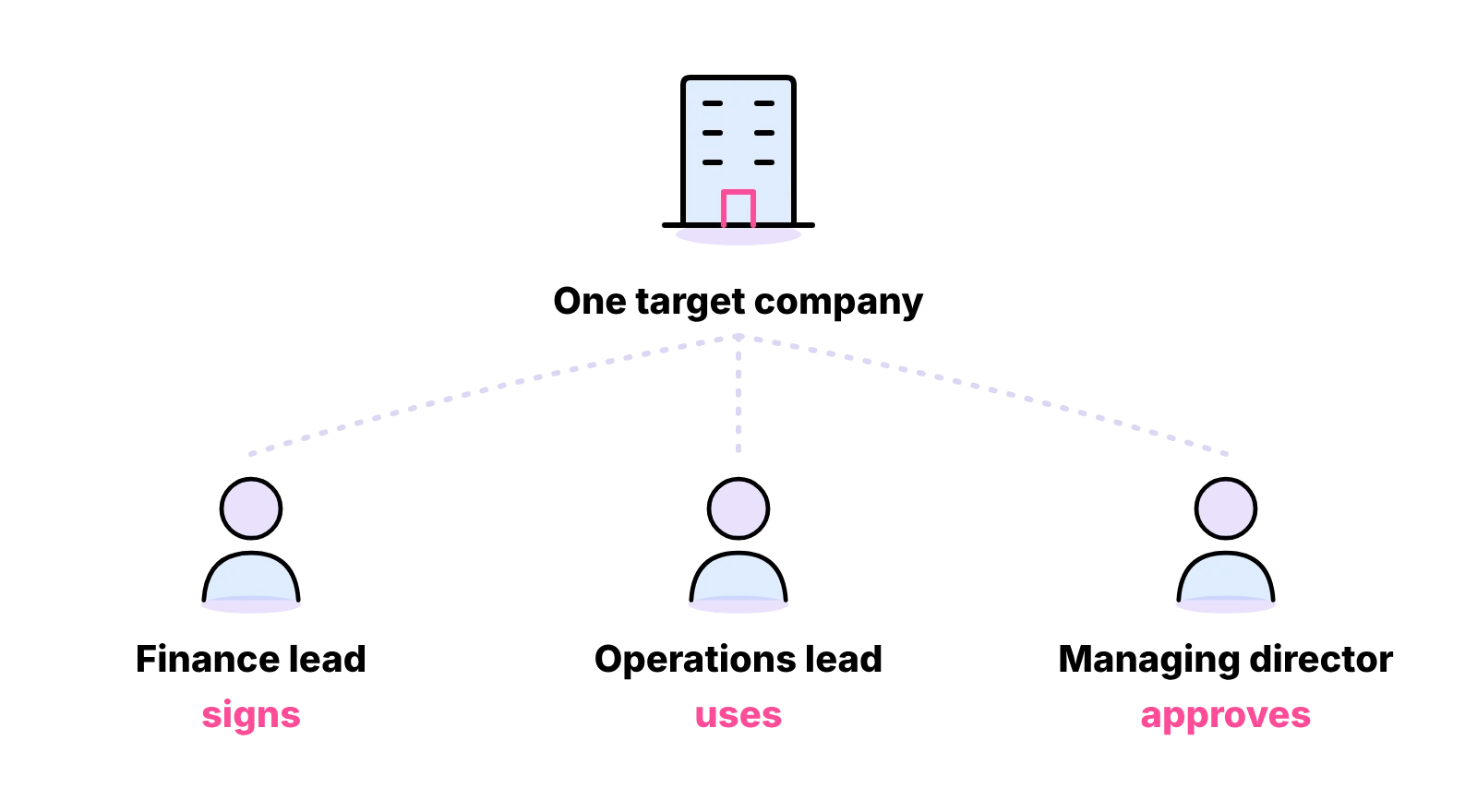
In B2B, one person rarely buys alone. A finance lead signs, an operations lead uses the product, and a managing director approves. Account-based targeting means choosing a short list of companies first and then mapping the two or three people in each who influence the decision. You connect with each of them, tailor the message to their role, and keep a record of every account so nobody is contacted twice by mistake. Our guide to lead list building and CRM data covers how to build and keep that list clean.
Profile as a landing page
Prospects check your profile before they reply. Treat it as a landing page.
- Headline: who you help and with what, in plain words. Your job title alone says little.
- About section: the problem you solve, who for, how you work and how to contact you. Short paragraphs, written to the buyer.
- Featured: one useful piece of content, a case example you are allowed to share, or a way to book a call.
- Activity: recent posts and comments that show you know the subject.
- Photo and banner: a clear, professional photo and a banner that says what the business does.
Content for inbound leads
Content is what makes outreach feel warm: a prospect who has seen your posts already knows your name.
Content types and cadence
Write about what your buyers worry about, in their words. Strong formats for B2B include:
- short posts that answer one question your customers ask often;
- lessons from your own work, with client details removed;
- a clear opinion on a change in your industry;
- simple checklists and how-tos;
- thoughtful comments on posts your buyers already read.
Pick a cadence you can keep. A few good posts a week, every week, keeps your name in front of buyers; a burst followed by silence lets them forget you. Batch the writing and schedule it.
The 4-1-1 rule
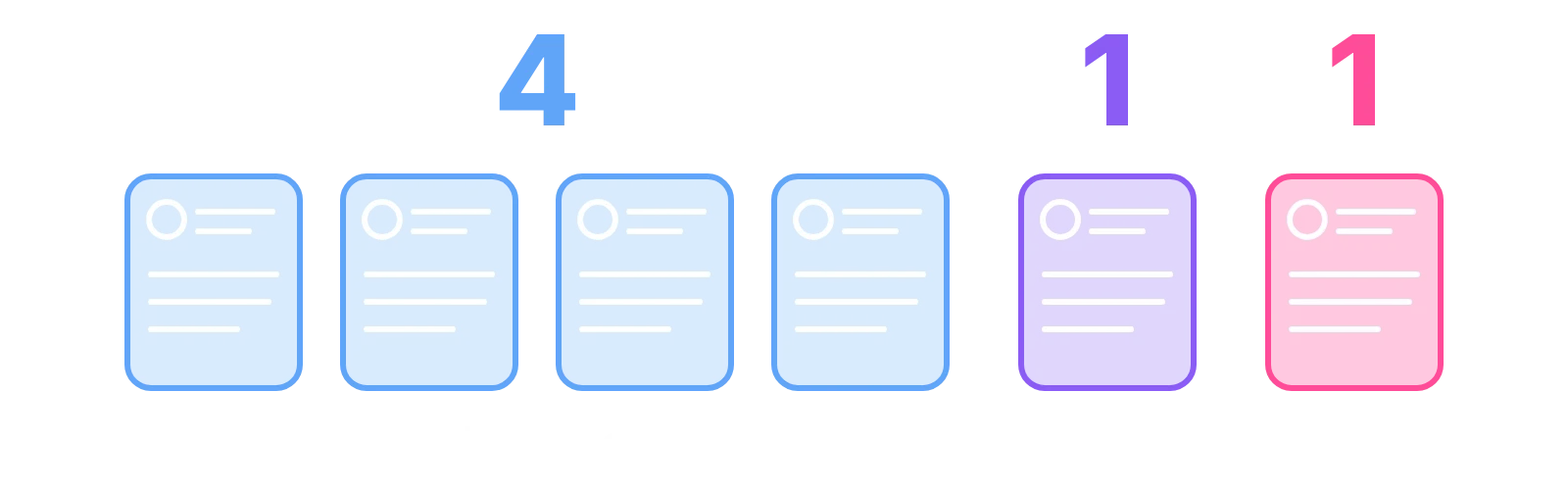
The 4-1-1 rule is a content rule of thumb from marketing practice; LinkedIn does not set it. For every six things you share, four are useful material from other people, one is your own original content, and one is a direct offer or promotion. The point is balance: most of what you post should help the reader, and only a small share should sell. Treat it as a guide to tone. If your feed reads like an advert, people stop reading it.
LinkedIn groups
Groups are quieter than the main feed, and the good ones are full of people who care about one subject. Join the groups your buyers belong to, read before you post, and answer questions properly. Do not drop links or pitches; members remember who did it. Group membership can also give you a genuine reason to connect with someone ("we are both in the same group and I saw your question about...").
Outbound search and outreach
Outbound is the fastest route to a conversation, and the one where mistakes cost the most.
Boolean and Sales Navigator search
LinkedIn's standard search lets you filter by keyword, location, company and connection level, and accepts Boolean search: AND, OR, NOT, quotation marks for exact phrases and brackets for grouping. For example: ("operations director" OR "head of operations") AND logistics NOT recruitment.
Sales Navigator, LinkedIn's paid sales tool, adds more search filters and ways to save leads and accounts into lists. It suits teams that prospect every day.
Is Premium enough?
For a small business starting out, LinkedIn Premium or even a free account with good Boolean searches can be enough to test the approach. Sales Navigator earns its cost when you prospect daily, need saved lists, or have more than one person doing outreach. Our guide to what LinkedIn lead generation costs sets out the plans and their published prices.
Connection requests and follow-ups
Keep the request short and personal: why you are connecting, in one or two sentences, with no pitch. Once they accept, send a first message that gives them something useful or asks a simple question. Follow up politely if they go quiet, and stop after a short sequence. Our guide to LinkedIn outreach message templates has ready-to-use requests, follow-ups and replies written for UK B2B.
LinkedIn ads and lead gen forms
Do lead gen forms work?
LinkedIn lead gen forms open inside LinkedIn and fill in the person's details from their profile, so they are quicker to complete than a form on your website. That makes them useful for gated content, event sign-ups and demo requests. The trade-off is quality: because the form is so easy, some people submit without much intent. Follow up quickly and qualify before you treat a form fill as a sales lead.
Retargeting
Retargeting shows ads to people who have already visited your website or engaged with your content. It works best as support for content and outreach. Start small, measure cost per meeting, and scale only what works.
Automation tools and account risks
Invitation limits and restrictions
LinkedIn limits how many connection requests you can send and how many can sit unanswered. It does not publish a fixed weekly number, and figures quoted elsewhere are unofficial. If you hit the limit, LinkedIn can restrict your ability to send invitations for a period, and its help page on invitation limits says that restriction cannot be shortened. Requests that go to the wrong people and sit ignored add to your unanswered pile, which is the thing the limit watches.
The practical rules are simple: send to people who match your ideal customer, personalise each request, withdraw old unanswered invitations, and keep the pace steady.
Choosing tools
Tools fall into three groups: data and enrichment tools that find emails and company details, CRMs that hold the record of every conversation, and automation tools that send requests and messages for you. Automation tools act through your own account, so any restriction they trigger lands on you. If you use one, keep the volumes modest, write every message yourself, and accept that the account is yours to lose. A CRM is the tool almost every team needs; automation is optional.
Expected results and measurement
Leads per month
Nobody can tell you honestly how many leads you will get per month before you start, and there is no independent benchmark we can point you to. It depends on your offer, your market, how many good-fit people exist, your profile and the quality of your messages. The useful approach is to run the routine for a fixed period, record the numbers below every week, and set your own baseline. After that, you can forecast with your own data, which beats anyone's average.

Key metrics
- Acceptance rate: accepted requests divided by requests sent. Low acceptance usually means the wrong audience or a weak profile.
- Reply rate: replies divided by first messages sent. Low replies usually mean the message is about you rather than them.
- Positive reply rate: replies that show interest, divided by first messages sent.
- Meetings booked: the number that pays the bills.
- Pipeline and won deals: tracked in your CRM against the LinkedIn source.
Review weekly, change one thing at a time, and keep notes on what you changed. If someone else runs the work, ask for the same numbers each week; our FAQ on how a VA reports lead generation results shows what a good report looks like.
Outsourcing LinkedIn prospecting to a virtual assistant
A dedicated virtual assistant can run your weekly LinkedIn prospecting routine, from list building and connection requests to follow-ups and CRM updates, while you take the calls they book. The strategy above is simple to describe. The hard part is doing it every week while also running a business.
The weekly routine
Whoever runs it, the week looks much the same:
- Monday: build and check the week's list of good-fit people and accounts.
- Tuesday and Wednesday: send personal connection requests and first messages to people who accepted.
- Thursday: follow up, reply to every response and book meetings.
- Every day: post or comment where your buyers gather.
- Friday: update the CRM and review the numbers.
In-house, VA or agency
An in-house hire gives you control and a full salary bill. An agency brings a process and usually runs it at arm's length. A dedicated virtual assistant sits between the two: one person working your list and your messages, every working day, with you taking the calls they book. Our guide on how to hire a VA for lead generation compares the options in detail.
What a managed service covers
At Ant Assist, a dedicated lead generation VA can run the routine: research and list building, connection requests, follow-ups, logging every conversation in your CRM and a weekly report. The VA is one named person, never shared, working full time from our managed office in Cairo on UK business hours, 9am to 5pm Monday to Friday, recruited, managed and supervised there, not a freelancer and not AI. Access runs through password managers and can be revoked, with NDAs and data-processing agreements in place. Rates start at £5 per hour on the introductory rate; put your own hours into the calculator to see the monthly cost.


LinkedIn prospecting FAQs
Didn't find your answer? Browse more common questions in the Help Center.
Your LinkedIn routine, run every week.
One dedicated outreach VA, from £5 per hour. Book a free 15-minute call.