
Amazon PPC management for small sellers
Amazon PPC management is a weekly routine: cut wasted search terms, adjust bids and keep ad cost under your margin. Run it yourself while your range is small.
Tools our VAs use for this


Amazon PPC management is the weekly routine of reviewing search terms, adding negative keywords, adjusting bids and budgets and checking which ads earn more than they cost. At the time of writing, Amazon says Sponsored Products ads have no monthly or upfront fees; you pay when a shopper clicks, up to the maximum bid you set. A small seller can run the routine themselves with a few hours a week, hand the strategy to an agency for a fee on top of ad spend, or have a VA run the routine under rules the seller sets. Pick by budget, time and how much you want to stay in control.
On this page
What Amazon PPC is and how it works
Amazon PPC is advertising on Amazon where you pay when a shopper clicks your ad, not when it is shown, up to a maximum bid you set.
Sponsored Products and other ad types
Sponsored Products are the ad type most sellers start with. According to Amazon Ads, they are cost-per-click ads that promote individual product listings. Amazon offers other ad formats too; check Amazon Ads for which your account can use. This guide uses Sponsored Products as the example throughout because it is where the weekly management work starts. Many small sellers pass that weekly work to an ecommerce VA.
How bidding works
You choose the keywords or products your ad should show against, and set the maximum you are willing to pay when a shopper clicks. Amazon's Sponsored Products page says there are no monthly or upfront fees: you pay for clicks, not for the ad being shown. Campaigns can target keywords you choose (manual) or let Amazon match your ad to searches (automatic). A daily budget caps what a campaign can spend.
What Amazon PPC management involves each week
Amazon PPC management each week means reading the search term report, adding negative keywords, moving proven search terms into manual campaigns, adjusting bids and budgets, and comparing ACoS with margin. This is the work itself.
Campaign setup
- Group products that share a margin and a purpose into the same campaign, so one budget does not feed a product that cannot afford it.
- Start an automatic campaign to see which searches Amazon matches, alongside a manual campaign for the keywords you already know.
- Set a daily budget you can afford to spend every day of the month.
- Name campaigns consistently, so the reports make sense in three months' time.
Keywords and negative keywords
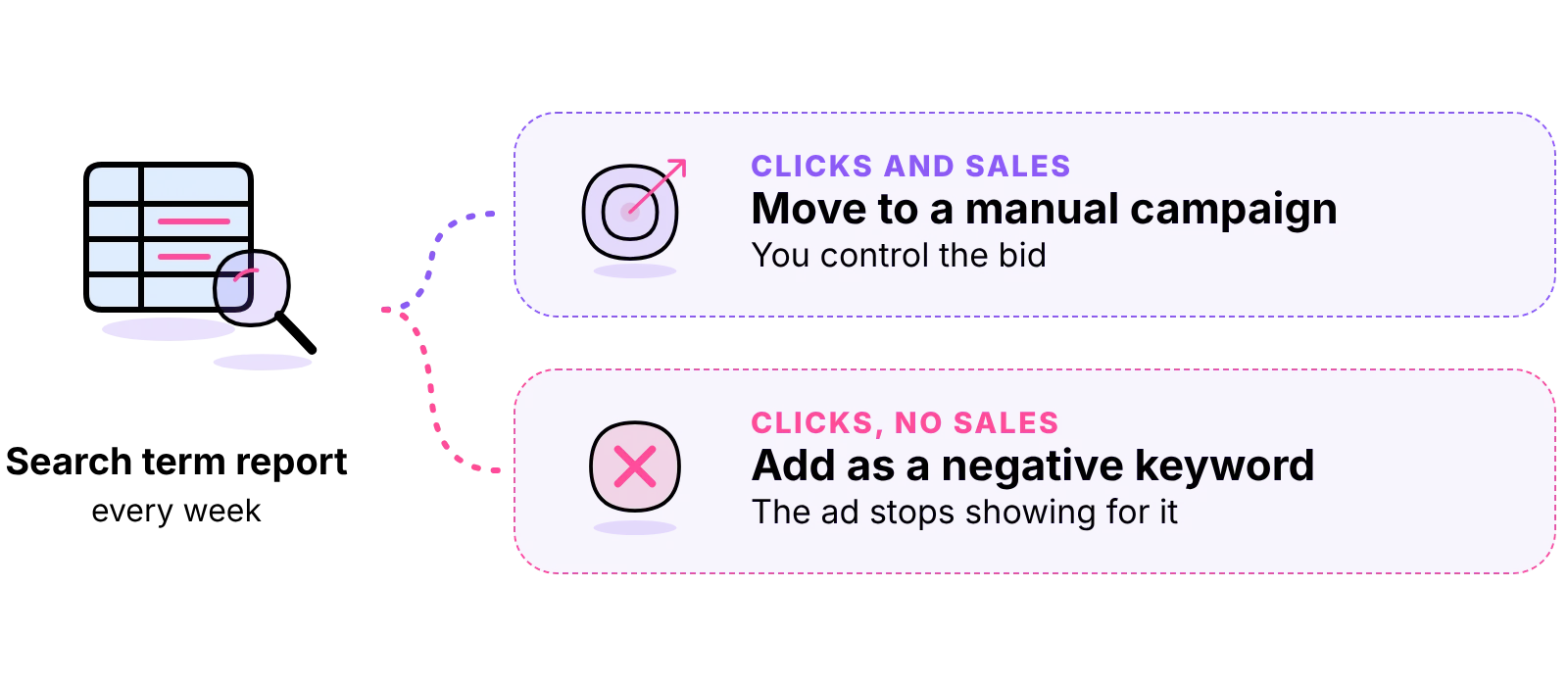
The search term report shows the actual words shoppers typed before clicking your ad. Read it every week. Move search terms that bring sales into a manual campaign where you control the bid. Add search terms that bring clicks and no sales as negative keywords, so the ad stops showing for them. This one task is where most wasted spend is found.
Bids and budgets
Raise bids, in small steps, on keywords that sell at a cost you can afford. Lower bids on keywords that spend more than they earn. Move budget from campaigns that run out early with poor results to those that run out early with good results. Change a few things at a time and give each change long enough to show its effect.
Reporting and ACoS
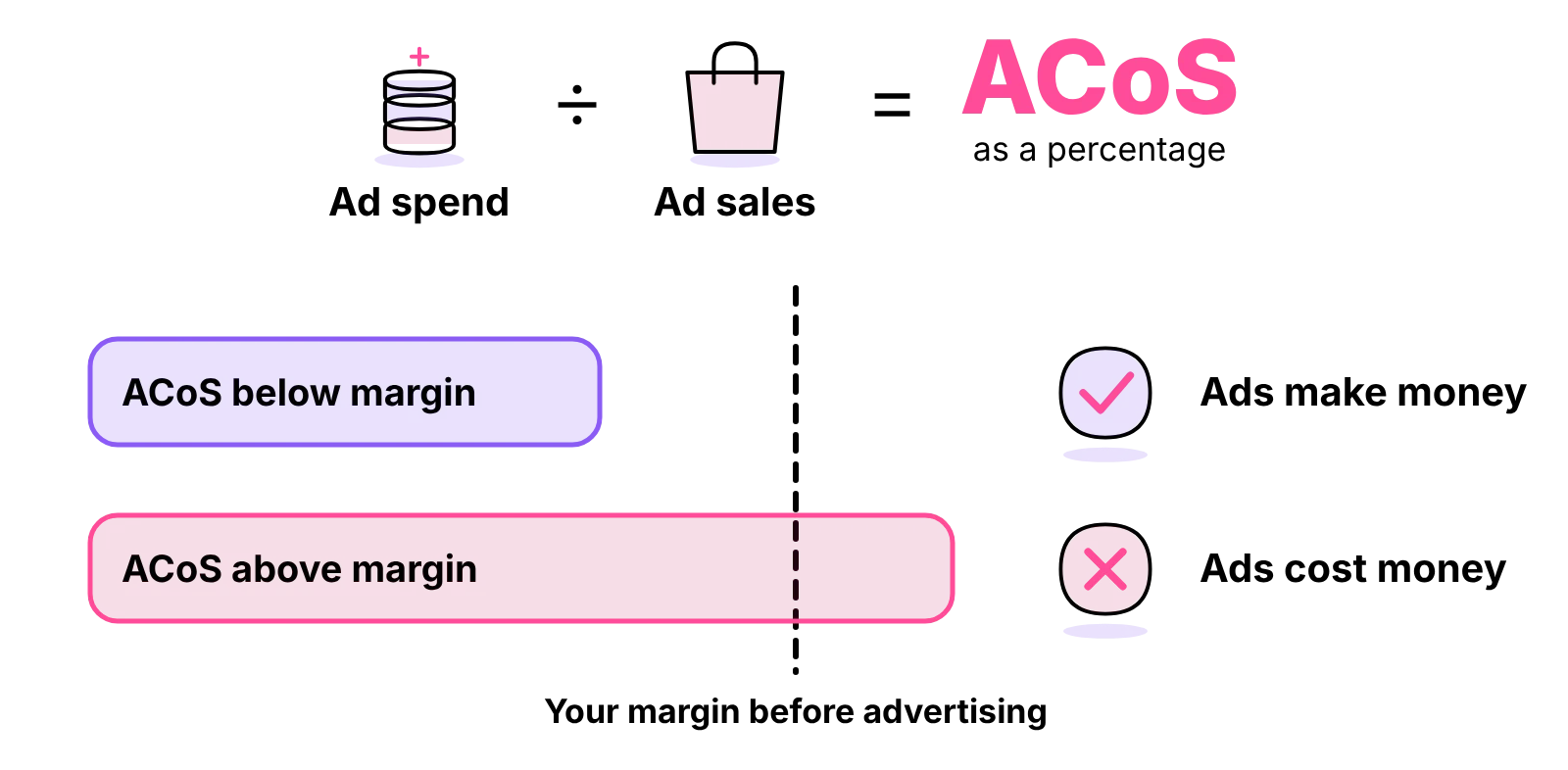
ACoS (advertising cost of sale) is ad spend divided by the sales those ads brought in, shown as a percentage. A lower ACoS means each pound of ad spend brought in more sales. There is no official "good" ACoS, and any target you see quoted is an opinion. The useful test is your own: compare ACoS with your profit margin before advertising. If ACoS is below that margin, the ads are making you money on those sales; if it is above, they are costing you money, unless you are deliberately paying to build sales history for a new product. Returns also eat into margin, as Shopify returns management for UK sellers explains.
Weekly checklist
- Download the search term report for the last week.
- Add negative keywords for terms with clicks and no sales.
- Move proven search terms into a manual campaign.
- Adjust bids on the keywords that spend most.
- Check which campaigns ran out of budget, and why.
- Compare ACoS with margin for each product.
- Check stock: pause ads on anything about to run out.
- Write down what you changed, so next week's review can judge it.
Metrics glossary
| Term | What it means |
|---|---|
| Impression | Your ad was shown to a shopper |
| Click | A shopper clicked your ad, and you paid |
| CPC (cost per click) | What you paid for a click; never more than your maximum bid |
| CTR (click-through rate) | Clicks divided by impressions |
| Conversion rate | Orders divided by clicks |
| ACoS | Ad spend divided by ad sales |
| Search term | The words a shopper typed before clicking your ad |
| Negative keyword | A term you tell Amazon not to show your ad for |
What Amazon PPC costs
Ad spend
At the time of writing, Amazon's Sponsored Products page says there are no monthly or upfront fees: you pay when a shopper clicks, up to your maximum bid. The ad spend is set by you, through your bids and daily budgets. Amazon's page opened for this guide gives no minimum budget or typical cost per click, so none is quoted here. Fees on other channels work differently, for example eBay seller fees UK.
Management fee models
If someone else runs your campaigns, their fee is on top of ad spend. Agencies and freelancers publish their own prices and they vary, so this guide quotes none. The common models are:
- A percentage of ad spend: the fee rises as you spend more, whether or not results improve.
- A flat monthly fee: predictable, and worth checking what is included and how many campaigns it covers.
- A flat fee plus a percentage: common for larger accounts.
- Performance-linked fees: check exactly what counts as performance and over what period.
- Hourly rates: you pay for the time spent, and you decide the scope.
Choosing a budget
Start with a daily budget you can afford for a full month without it hurting stock purchases. Spend on your best-margin products first, because they can carry a higher ACoS and still make money. Increase the budget only when the reports show campaigns earning more than they cost. Stock levels matter here too, so read up on stock control methods for small businesses.
Is Amazon PPC worth it?
For most new listings, some advertising is how shoppers find the product while it has no sales history or reviews. It is worth it when ACoS stays below your margin, or when you are paying on purpose to build sales history for a set period. It is not worth it on a product with almost no margin, or while the listing itself is weak: ads send shoppers to the page, and a poor page wastes the click. Our guide is Amazon FBA worth it shows how advertising fits into the profit per unit.
How long it takes to see results
There is no official figure. Automatic campaigns start gathering search terms as soon as they run, and each week's report gives you more to act on. Judge a change over enough clicks to mean something, not over a day or two. If you are just starting, our guide on how to start Amazon FBA in the UK covers what to have in place before the ads go live. Stock must reach Amazon first, which is where Amazon FBA prep comes in.
Who should manage the campaigns
Run Amazon PPC yourself if you have weekly hours and a small range, hire an agency to set the strategy, or use a VA for the routine if you set the rules but lack the hours.
Running it yourself
Running your own campaigns costs nothing but time and teaches you how your products sell. It suits a small range, a modest budget and a seller who can block out time every week. The risk is the week you skip: search terms that waste money keep spending until someone adds the negatives.
Hiring an agency
An agency brings experience across many accounts and takes the strategy off your hands. It suits sellers with a larger budget, a wide range or a launch where the stakes are high. The cost is a fee on top of ad spend, and you need to keep enough understanding to judge its reports.

Using a VA for routine tasks
A VA runs the weekly routine, the reports, the negatives, the bid changes inside limits you set, while you keep the strategy and the budget. It suits a seller who knows what they want from the ads but cannot find the hours to do the work every week.
Making the decision
- If you have the hours every week and a small range, do it yourself.
- If you want someone else to set the strategy and you can afford a fee on top of spend, hire an agency.
- If you can set the rules but cannot find the hours, use a VA for the routine.
Choosing an agency: questions to ask
- Who exactly will work on my account, and how many other accounts do they handle?
- What will you do each week, and what will you report to me?
- How is your fee calculated, and does it change as ad spend rises?
- Will I keep full access to my ad account and all the data if we stop?
- What changes will you make without asking me first, and what needs my approval?
- How do you decide when a campaign is working?
Checking contract terms
Read the minimum term, the notice period and what happens to the campaigns, the account access and the reports when you leave. Check whether the fee is charged on spend you set or spend the provider sets, and whether set-up or audit fees apply. Make sure the ad account stays in your name.
Handing weekly PPC tasks to a virtual assistant
A dedicated Amazon VA from Ant Assist can run the weekly routine on your account under your rules: pulling the search term report, adding negatives, adjusting bids within the limits you set, flagging budgets that run out early and pausing ads on stock about to run low. You keep the strategy and the budget; your VA does the work and reports what changed. The same VA can keep listings up to date through our product listing and catalogue management service, so the ads point at pages that sell.
How the arrangement works
Your VA is one named person, never shared, working full time from our own managed office in Cairo, recruited, managed and supervised there, not a freelancer and not AI, on UK business hours, 9am to 5pm Monday to Friday. Access to your seller and ad accounts is through a password manager and can be revoked at any time, under an NDA and a data-processing agreement. Hours range from 20 a week to a full 40-hour VA. For help across the wider store, see our dedicated e-commerce assistant service.
Rates and fees
The ecommerce rate starts at £5 per hour for the first 6 months on Entry (3 months on Mid, 1 month on Expert). After the promotion, Entry is £6.50 per hour full time (£1,040 a month for 160 hours) or £6.80 per hour part time (£544 a month for 80 hours). There are no platform fees and no percentage of your ad spend. Try your hours in the calculator, and see how to hire an ecommerce VA for the steps.



Questions about Amazon advertising
Didn't find your answer? Browse more common questions in the Help Center.
Ads checked every week, by one person.
One dedicated ecommerce VA, from £5 per hour. Book a call.